
Note
Go to the end to download the full example code.
Analyzing Events Using ctapipe#
Initially presented @ LST Analysis Bootcamp in Padova, 26.11.2018 by Maximilian Nöthe (@maxnoe) & Kai A. Brügge (@mackaiver)
13 import tempfile
14 import timeit
15 from copy import deepcopy
16
17 import astropy.units as u
18 import matplotlib.pyplot as plt
19 import numpy as np
20 from astropy.coordinates import AltAz, angular_separation
21 from matplotlib.colors import ListedColormap
22 from scipy.sparse.csgraph import connected_components
23 from traitlets.config import Config
24
25 from ctapipe.calib import CameraCalibrator
26 from ctapipe.image import (
27     ImageProcessor,
28     camera_to_shower_coordinates,
29     concentration_parameters,
30     hillas_parameters,
31     leakage_parameters,
32     number_of_islands,
33     timing_parameters,
34     toymodel,
35 )
36 from ctapipe.image.cleaning import tailcuts_clean
37 from ctapipe.io import DataWriter, EventSource, TableLoader
38 from ctapipe.reco import ShowerProcessor
39 from ctapipe.utils.datasets import get_dataset_path
40 from ctapipe.visualization import ArrayDisplay, CameraDisplay
41
42 # %matplotlib inline
45 plt.rcParams["figure.figsize"] = (12, 8)
46 plt.rcParams["font.size"] = 14
47 plt.rcParams["figure.figsize"]
[12.0, 8.0]
General Information#
Design#
DL0 → DL3 analysis
Currently some R0 → DL2 code to be able to analyze simtel files
ctapipe is built upon the Scientific Python Stack, core dependencies are
numpy
scipy
astropy
numba
Development#
ctapipe is developed as Open Source Software (BSD 3-Clause License) at cta-observatory/ctapipe
We use the “Github-Workflow”:
Few people (e.g. @kosack, @maxnoe) have write access to the main repository
Contributors fork the main repository and work on branches
Pull Requests are merged after Code Review and automatic execution of the test suite
Early development stage ⇒ backwards-incompatible API changes might and will happen
What’s there?#
Reading simtel simulation files
Simple calibration, cleaning and feature extraction functions
Camera and Array plotting
Coordinate frames and transformations
Stereo-reconstruction using line intersections
What’s still missing?#
Good integration with machine learning techniques
IRF calculation
Documentation, e.g. formal definitions of coordinate frames
What can you do?#
Report issues
Hard to get started? Tell us where you are stuck
Tell user stories
Missing features
Start contributing
ctapipe needs more workpower
Implement new reconstruction features
A simple hillas analysis#
Reading in simtel files#
145 input_url = get_dataset_path("gamma_prod5.simtel.zst")
146
147 # EventSource() automatically detects what kind of file we are giving it,
148 # if already supported by ctapipe
149 source = EventSource(input_url, max_events=5)
150
151 print(type(source))
<class 'ctapipe.io.simteleventsource.SimTelEventSource'>
154 for event in source:
155     print(
156         "Id: {}, E = {:1.3f}, Telescopes: {}".format(
157             event.count, event.simulation.shower.energy, len(event.r0.tel)
158         )
159     )
Id: 0, E = 0.073 TeV, Telescopes: 3
Id: 1, E = 1.745 TeV, Telescopes: 14
Id: 2, E = 1.745 TeV, Telescopes: 4
Id: 3, E = 1.745 TeV, Telescopes: 20
Id: 4, E = 1.745 TeV, Telescopes: 31
Each event is a DataContainer holding several Fields of data,
which can be containers or just numbers. Let’s look a one event:
167 event
ctapipe.containers.ArrayEventContainer:
                       index.*: event indexing information with default None
                          r0.*: Raw Data with default None
                          r1.*: R1 Calibrated Data with default None
                         dl0.*: DL0 Data Volume Reduced Data with default None
                         dl1.*: DL1 Calibrated image with default None
                         dl2.*: DL2 reconstruction info with default None
                  simulation.*: Simulated Event Information with default None
                                with type <class
                                'ctapipe.containers.SimulatedEventContainer'>
                     trigger.*: central trigger information with default None
                         count: number of events processed with default 0
                  monitoring.*: container for event-wise monitoring data (MON)
                                with default None
                        muon.*: Container for muon analysis results with default
                                None
(CameraDescription(name=CHEC, geometry=CHEC, readout=CHEC), CameraDescription(name=FlashCam, geometry=FlashCam, readout=FlashCam), CameraDescription(name=LSTCam, geometry=LSTCam, readout=LSTCam), CameraDescription(name=NectarCam, geometry=NectarCam, readout=NectarCam))
173 len(event.r0.tel), len(event.r1.tel)
(31, 31)
Data calibration#
The CameraCalibrator calibrates the event (obtaining the dl1
images).
185 calibrator = CameraCalibrator(subarray=source.subarray)
188 calibrator(event)
Event displays#
Let’s use ctapipe’s plotting facilities to plot the telescope images
198 event.dl1.tel.keys()
dict_keys([3, 4, 8, 9, 14, 15, 23, 24, 25, 29, 32, 36, 42, 46, 52, 56, 103, 104, 109, 110, 118, 119, 120, 126, 127, 129, 130, 137, 139, 143, 161])
201 tel_id = 130
204 geometry = source.subarray.tel[tel_id].camera.geometry
205 dl1 = event.dl1.tel[tel_id]
206
207 geometry, dl1
(CameraGeometry(name='NectarCam', pix_type=PixelShape.HEXAGON, npix=1855, cam_rot=0.000 deg, pix_rot=40.893 deg, frame=<CameraFrame Frame (focal_length=16.445049285888672 m, rotation=0.0 rad, telescope_pointing=None, obstime=None, location=None)>), ctapipe.containers.DL1CameraContainer:
                         image: Numpy array of camera image, after waveform
                                extraction.Shape: (n_pixel) if n_channels is 1
                                or data is gain selectedelse: (n_channels,
                                n_pixel) with default None
                     peak_time: Numpy array containing position of the peak of
                                the pulse as determined by the extractor.Shape:
                                (n_pixel) if n_channels is 1 or data is gain
                                selectedelse: (n_channels, n_pixel) with default
                                None
                    image_mask: Boolean numpy array where True means the pixel
                                has passed cleaning. Shape: (n_pixel, ) with
                                default None as a 1-D array with dtype bool
                      is_valid: True if image extraction succeeded, False if
                                failed or in the case of TwoPass methods, that
                                the first pass only was returned. with default
                                False
                    parameters: Image parameters with default None with type
                                <class
                                'ctapipe.containers.ImageParametersContainer'>)
210 dl1.image
array([-0.3856395 ,  1.2851689 ,  1.403967  , ...,  2.6847053 ,
        0.04941979, -1.0566036 ], shape=(1855,), dtype=float32)
214 display = CameraDisplay(geometry)
215
216 # right now, there might be one image per gain channel.
217 # This will change as soon as
218 display.image = dl1.image
219 display.add_colorbar()
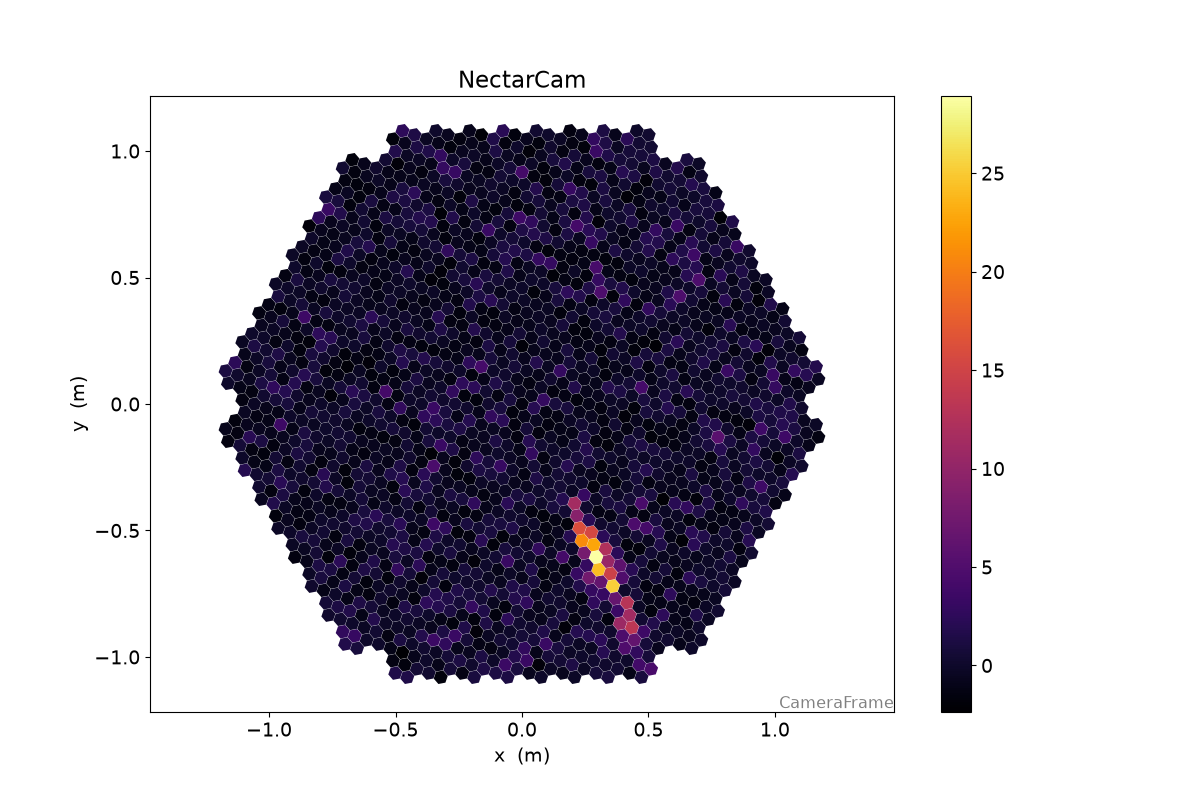
Image Cleaning#
228 # unoptimized cleaning levels
229 cleaning_level = {
230     "CHEC": (2, 4, 2),
231     "LSTCam": (3.5, 7, 2),
232     "FlashCam": (3.5, 7, 2),
233     "NectarCam": (4, 8, 2),
234 }
237 boundary, picture, min_neighbors = cleaning_level[geometry.name]
238
239 clean = tailcuts_clean(
240     geometry,
241     dl1.image,
242     boundary_thresh=boundary,
243     picture_thresh=picture,
244     min_number_picture_neighbors=min_neighbors,
245 )
248 fig, (ax1, ax2) = plt.subplots(1, 2, figsize=(15, 5))
249
250 d1 = CameraDisplay(geometry, ax=ax1)
251 d2 = CameraDisplay(geometry, ax=ax2)
252
253 ax1.set_title("Image")
254 d1.image = dl1.image
255 d1.add_colorbar(ax=ax1)
256
257 ax2.set_title("Pulse Time")
258 d2.image = dl1.peak_time - np.average(dl1.peak_time, weights=dl1.image)
259 d2.cmap = "RdBu_r"
260 d2.add_colorbar(ax=ax2)
261 d2.set_limits_minmax(-20, 20)
262
263 d1.highlight_pixels(clean, color="red", linewidth=1)
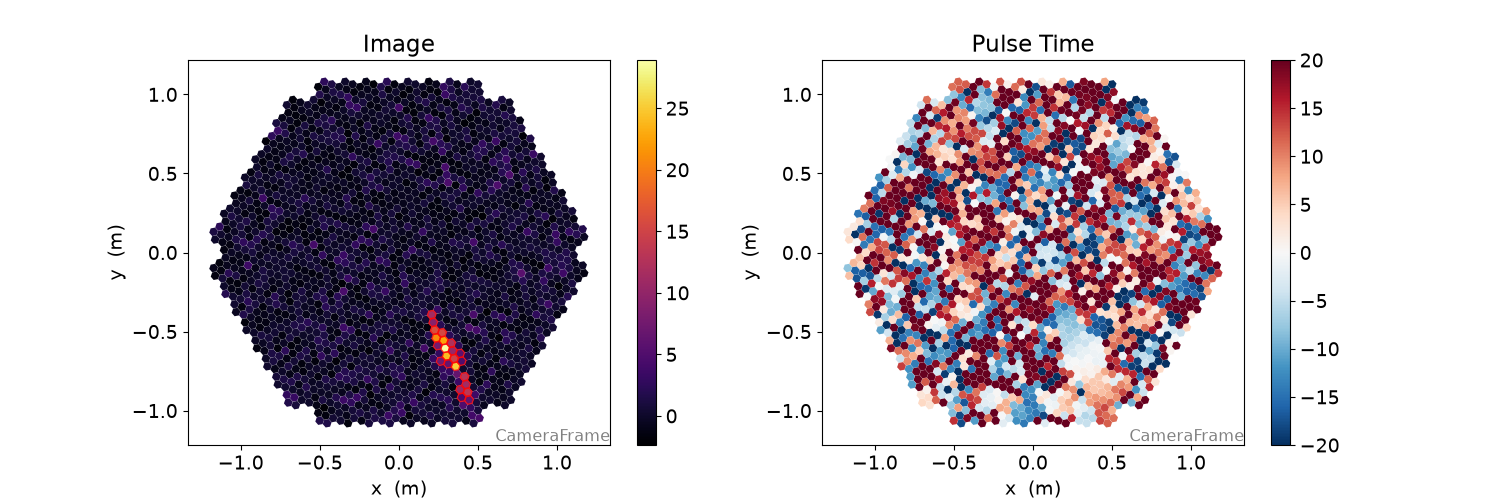
Image Parameters#
{'intensity': np.float64(303.9444303512573),
 'kurtosis': np.float64(2.4649477808816265),
 'length': <Quantity 0.14667835 m>,
 'length_uncertainty': <Quantity 0.00509155 m>,
 'phi': <Angle -1.11344351 rad>,
 'psi': <Angle -1.12308339 rad>,
 'psi_uncertainty': <Angle 0.01927114 rad>,
 'r': <Quantity 0.71788425 m>,
 'skewness': np.float64(0.360906379879541),
 'transverse_cog_uncertainty': <Quantity 0.00261556 m>,
 'width': <Quantity 0.02584731 m>,
 'width_uncertainty': <Quantity 0.00111159 m>,
 'x': <Quantity 0.31699941 m>,
 'y': <Quantity -0.64410339 m>}
277 display = CameraDisplay(geometry)
278
279 # set "unclean" pixels to 0
280 cleaned = dl1.image.copy()
281 cleaned[~clean] = 0.0
282
283 display.image = cleaned
284 display.add_colorbar()
285
286 display.overlay_moments(hillas, color="xkcd:red")
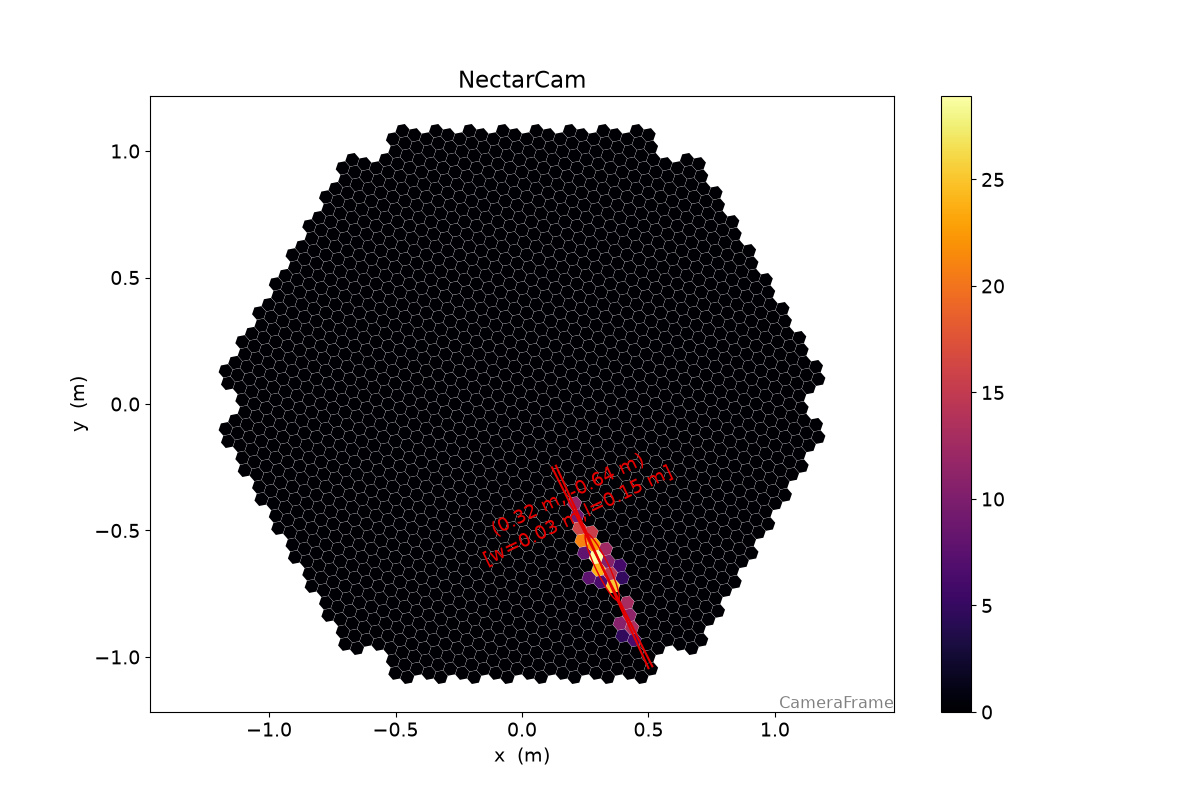
289 timing = timing_parameters(geometry, dl1.image, dl1.peak_time, hillas, clean)
290
291 print(timing)
{'deviation': 0.792151827050336,
 'intercept': np.float64(21.81257256241495),
 'slope': <Quantity 31.32320575 1 / m>}
294 long, trans = camera_to_shower_coordinates(
295     geometry.pix_x, geometry.pix_y, hillas.x, hillas.y, hillas.psi
296 )
297
298 plt.plot(long[clean], dl1.peak_time[clean], "o")
299 plt.plot(long[clean], timing.slope * long[clean] + timing.intercept)
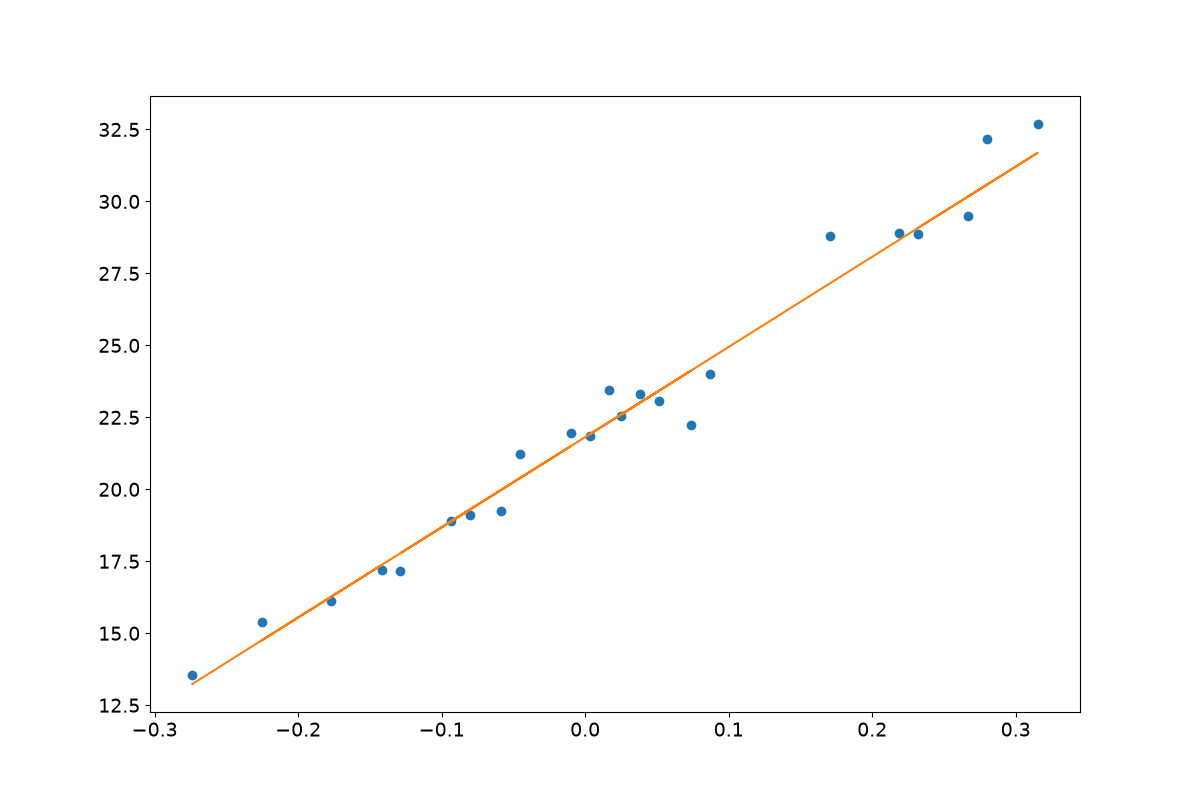
[<matplotlib.lines.Line2D object at 0x7c2220192960>]
{'intensity_width_1': np.float32(0.0),
 'intensity_width_2': np.float32(0.0),
 'pixels_width_1': np.float64(0.0),
 'pixels_width_2': np.float64(0.0)}
306 disp = CameraDisplay(geometry)
307 disp.image = dl1.image
308 disp.highlight_pixels(geometry.get_border_pixel_mask(1), linewidth=2, color="xkcd:red")
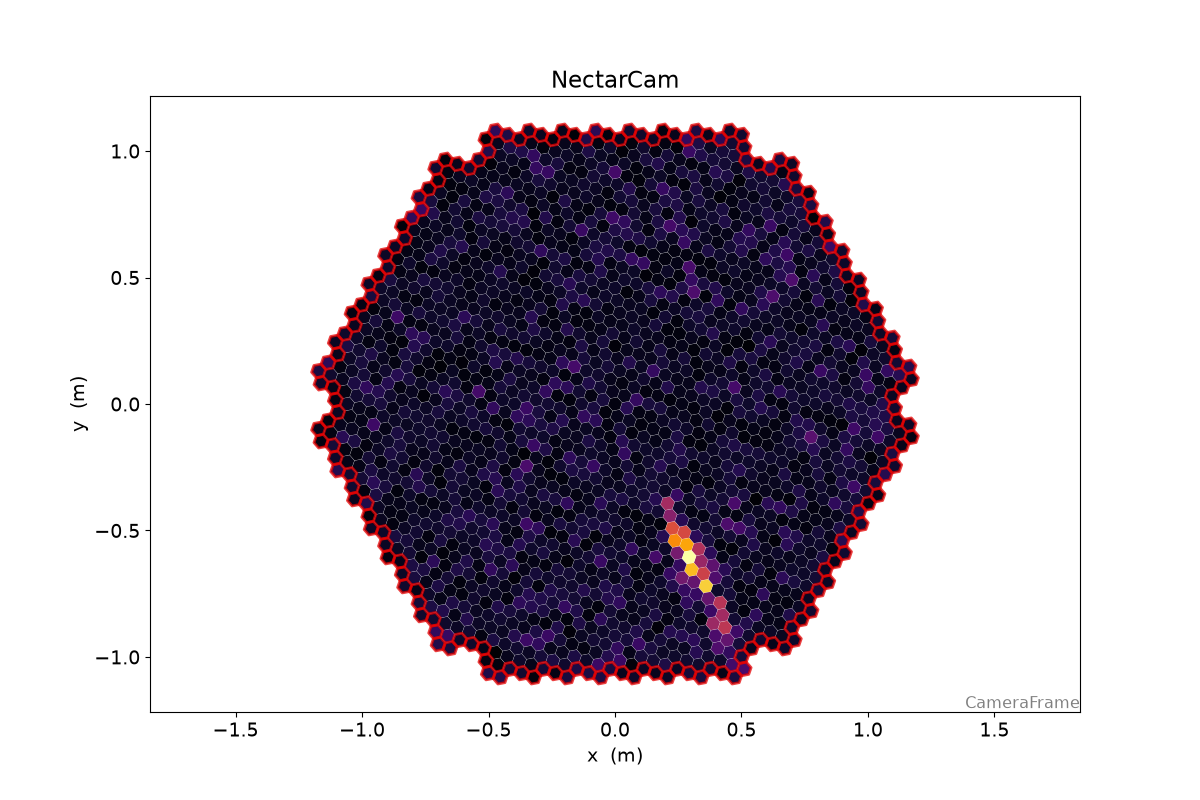
2
{'cog': np.float64(0.2571728392782083),
 'core': np.float64(0.4014042974365615),
 'pixel': np.float64(0.09514053791448862)}
Putting it all together / Stereo reconstruction#
All these steps are now unified in several components configurable through the config system, mainly:
CameraCalibrator for DL0 → DL1 (Images)
ImageProcessor for DL1 (Images) → DL1 (Parameters)
ShowerProcessor for stereo reconstruction of the shower geometry
DataWriter for writing data into HDF5
A command line tool doing these steps and writing out data in HDF5
format is available as ctapipe-process
337 image_processor_config = Config(
338     {
339         "ImageProcessor": {
340             "image_cleaner_type": "TailcutsImageCleaner",
341             "TailcutsImageCleaner": {
342                 "picture_threshold_pe": [
343                     ("type", "LST_LST_LSTCam", 7.5),
344                     ("type", "MST_MST_FlashCam", 8),
345                     ("type", "MST_MST_NectarCam", 8),
346                     ("type", "SST_ASTRI_CHEC", 7),
347                 ],
348                 "boundary_threshold_pe": [
349                     ("type", "LST_LST_LSTCam", 5),
350                     ("type", "MST_MST_FlashCam", 4),
351                     ("type", "MST_MST_NectarCam", 4),
352                     ("type", "SST_ASTRI_CHEC", 4),
353                 ],
354             },
355         }
356     }
357 )
358
359 input_url = get_dataset_path("gamma_prod5.simtel.zst")
360 source = EventSource(input_url)
361
362 calibrator = CameraCalibrator(subarray=source.subarray)
363 image_processor = ImageProcessor(
364     subarray=source.subarray, config=image_processor_config
365 )
366 shower_processor = ShowerProcessor(subarray=source.subarray)
367 horizon_frame = AltAz()
368
369 f = tempfile.NamedTemporaryFile(suffix=".hdf5")
370
371 with DataWriter(source, output_path=f.name, overwrite=True, write_dl2=True) as writer:
372     for event in source:
373         energy = event.simulation.shower.energy
374         n_telescopes_r1 = len(event.r1.tel)
375         event_id = event.index.event_id
376         print(f"Id: {event_id}, E = {energy:1.3f}, Telescopes (R1): {n_telescopes_r1}")
377
378         calibrator(event)
379         image_processor(event)
380         shower_processor(event)
381
382         stereo = event.dl2.stereo.geometry["HillasReconstructor"]
383         if stereo.is_valid:
384             print("  Alt: {:.2f}°".format(stereo.alt.deg))
385             print("  Az: {:.2f}°".format(stereo.az.deg))
386             print("  Hmax: {:.0f}".format(stereo.h_max))
387             print("  CoreX: {:.1f}".format(stereo.core_x))
388             print("  CoreY: {:.1f}".format(stereo.core_y))
389             print("  Multiplicity: {:d}".format(len(stereo.telescopes)))
390
391         # save a nice event for plotting later
392         if event.count == 3:
393             plotting_event = deepcopy(event)
394
395         writer(event)
Overwriting /tmp/tmpxlmq768m.hdf5
Id: 4009, E = 0.073 TeV, Telescopes (R1): 3
  Alt: 70.18°
  Az: 0.41°
  Hmax: 14066 m
  CoreX: -113.2 m
  CoreY: 366.5 m
  Multiplicity: 3
Id: 5101, E = 1.745 TeV, Telescopes (R1): 14
  Alt: 70.00°
  Az: 359.95°
  Hmax: 10329 m
  CoreX: -739.5 m
  CoreY: -268.4 m
  Multiplicity: 10
Id: 5103, E = 1.745 TeV, Telescopes (R1): 4
  Alt: 70.21°
  Az: 0.50°
  Hmax: 11526 m
  CoreX: 832.1 m
  CoreY: 945.4 m
  Multiplicity: 2
Id: 5104, E = 1.745 TeV, Telescopes (R1): 20
  Alt: 70.16°
  Az: 0.07°
  Hmax: 10643 m
  CoreX: -518.3 m
  CoreY: -451.5 m
  Multiplicity: 15
Id: 5105, E = 1.745 TeV, Telescopes (R1): 31
  Alt: 70.02°
  Az: 0.13°
  Hmax: 10449 m
  CoreX: -327.7 m
  CoreY: 408.8 m
  Multiplicity: 25
Id: 5108, E = 1.745 TeV, Telescopes (R1): 3
  Alt: 69.95°
  Az: 359.79°
  Hmax: 10409 m
  CoreX: -1304.5 m
  CoreY: 205.6 m
  Multiplicity: 2
Id: 5109, E = 1.745 TeV, Telescopes (R1): 8
  Alt: 69.62°
  Az: 359.93°
  Hmax: 10886 m
  CoreX: -1067.6 m
  CoreY: 480.5 m
  Multiplicity: 3
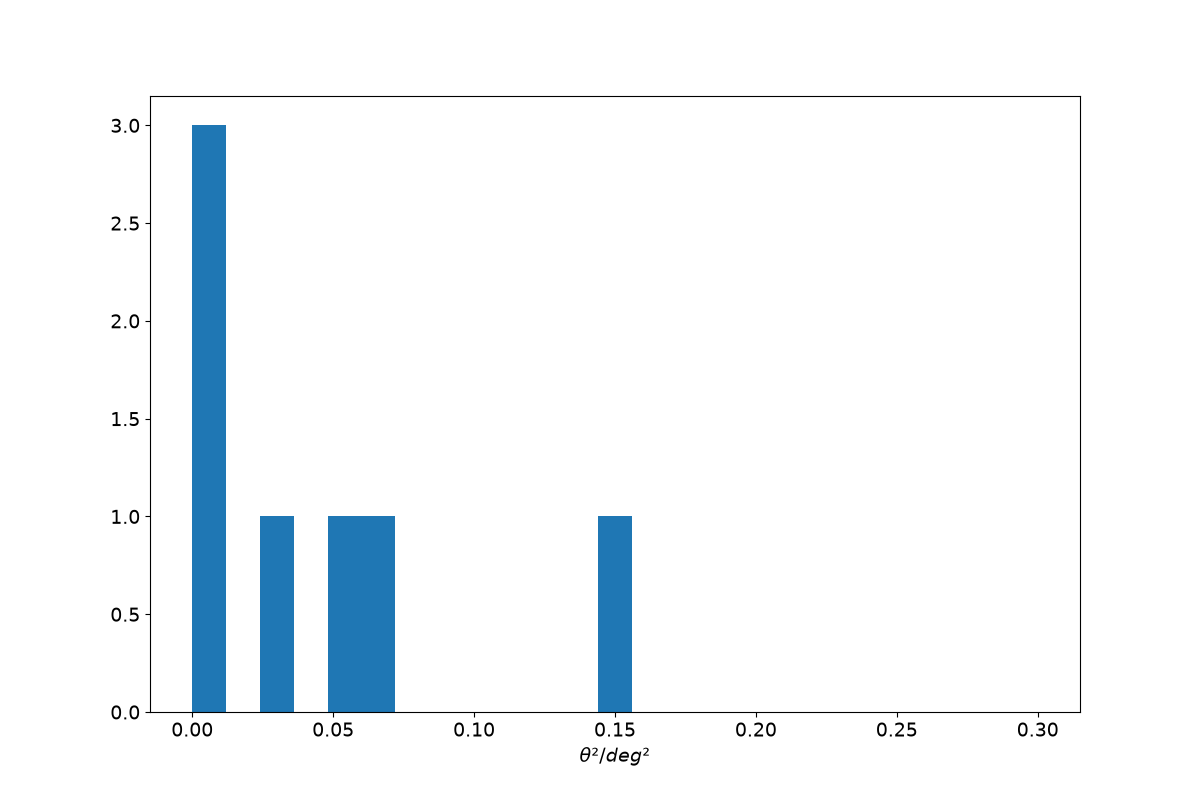
399 loader = TableLoader(f.name)
400
401 events = loader.read_subarray_events()
404 theta = angular_separation(
405     events["HillasReconstructor_az"].quantity,
406     events["HillasReconstructor_alt"].quantity,
407     events["true_az"].quantity,
408     events["true_alt"].quantity,
409 )
410
411 plt.hist(theta.to_value(u.deg) ** 2, bins=25, range=[0, 0.3])
412 plt.xlabel(r"$\theta² / deg²$")
413 None
ArrayDisplay#
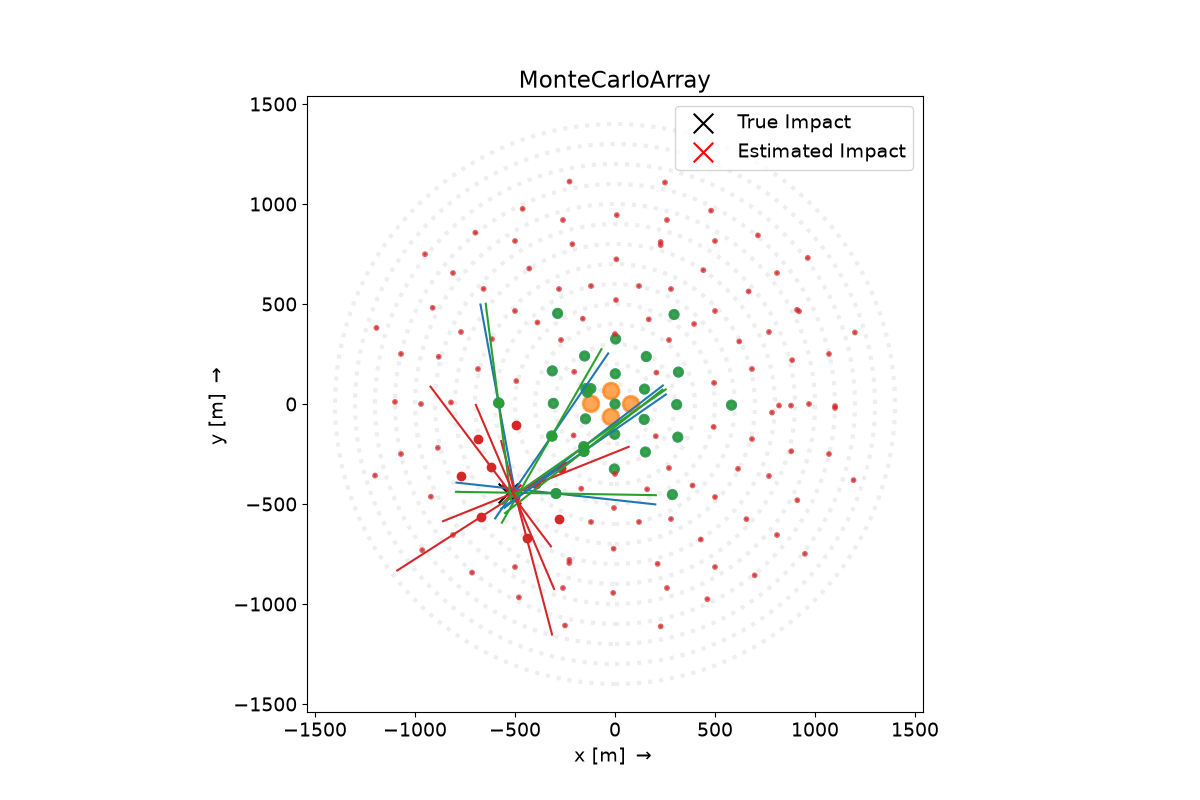
422 angle_offset = plotting_event.monitoring.pointing.array_azimuth
423
424 plotting_hillas = {
425     tel_id: dl1.parameters.hillas for tel_id, dl1 in plotting_event.dl1.tel.items()
426 }
427
428 plotting_core = {
429     tel_id: dl1.parameters.core.psi for tel_id, dl1 in plotting_event.dl1.tel.items()
430 }
431
432
433 disp = ArrayDisplay(source.subarray)
434
435 disp.set_line_hillas(plotting_hillas, plotting_core, 500)
436
437 plt.scatter(
438     plotting_event.simulation.shower.core_x,
439     plotting_event.simulation.shower.core_y,
440     s=200,
441     c="k",
442     marker="x",
443     label="True Impact",
444 )
445 plt.scatter(
446     plotting_event.dl2.stereo.geometry["HillasReconstructor"].core_x,
447     plotting_event.dl2.stereo.geometry["HillasReconstructor"].core_y,
448     s=200,
449     c="r",
450     marker="x",
451     label="Estimated Impact",
452 )
453
454 plt.legend()
455 # plt.xlim(-400, 400)
456 # plt.ylim(-400, 400)
<matplotlib.legend.Legend object at 0x7c2221eb3020>
Reading the LST dl1 data#
464 loader = TableLoader(f.name)
465
466 dl1_table = loader.read_telescope_events(
467     ["LST_LST_LSTCam"],
468     dl2=False,
469     true_parameters=False,
470 )
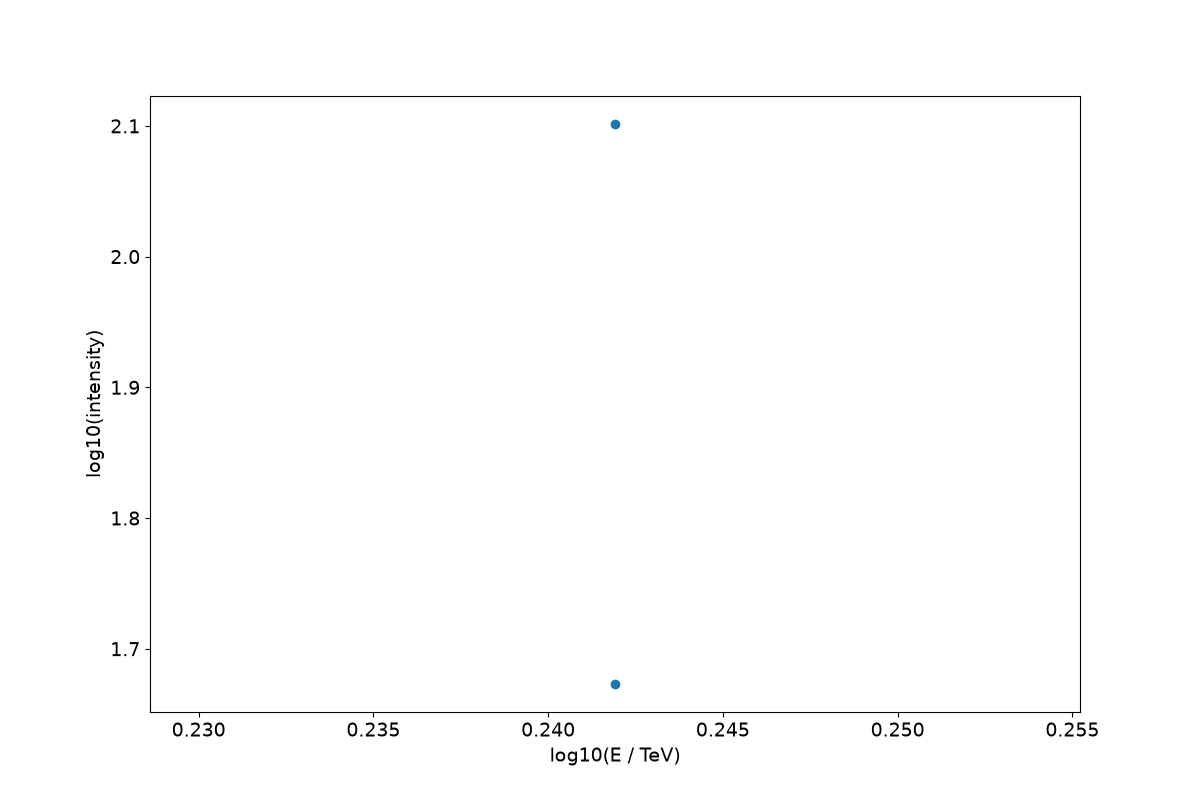
473 plt.scatter(
474     np.log10(dl1_table["true_energy"].quantity / u.TeV),
475     np.log10(dl1_table["hillas_intensity"]),
476 )
477 plt.xlabel("log10(E / TeV)")
478 plt.ylabel("log10(intensity)")
479 None
Isn’t python slow?#
Many of you might have heard: “Python is slow”.
That’s trueish.
All python objects are classes living on the heap, even integers.
Looping over lots of “primitives” is quite slow compared to other languages.
But: “Premature Optimization is the root of all evil” — Donald Knuth
So profile to find exactly what is slow.
Why use python then?#
Python works very well as glue for libraries of all kinds of languages
Python has a rich ecosystem for data science, physics, algorithms, astronomy
Example: Number of Islands#
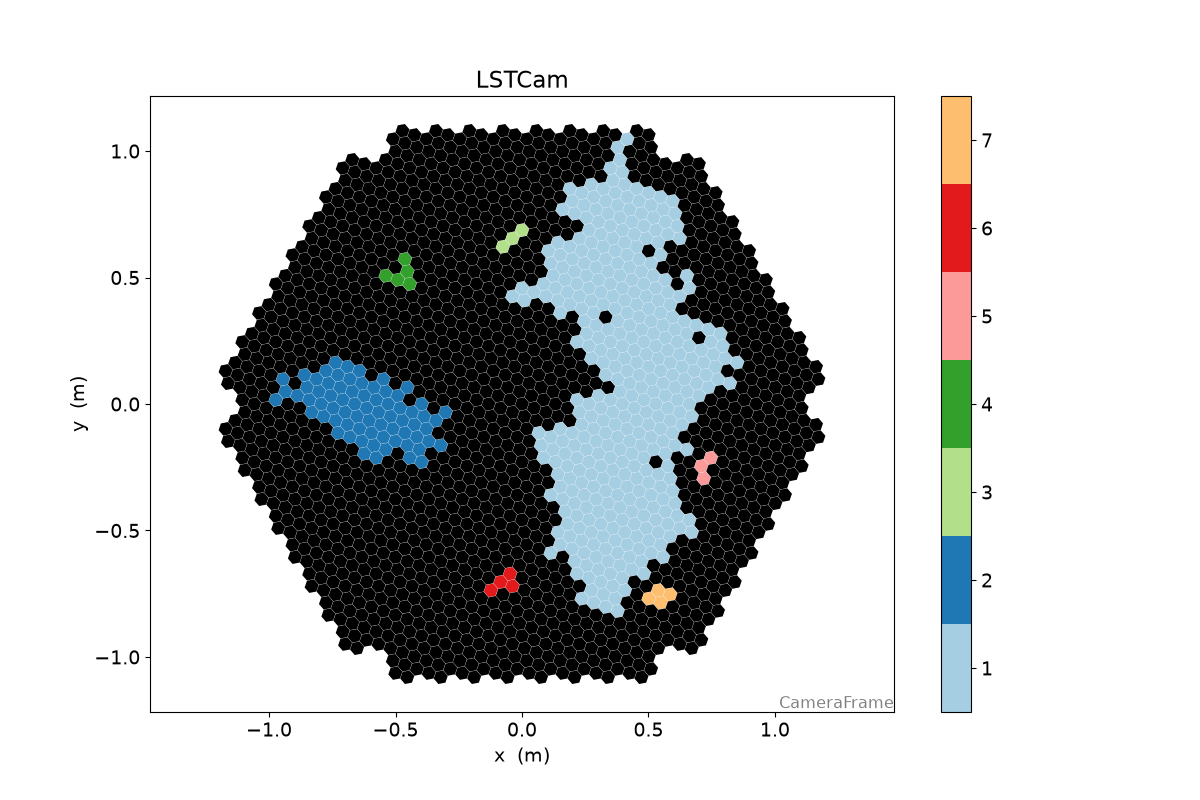
Find all groups of pixels, that survived the cleaning
515 geometry = loader.subarray.tel[1].camera.geometry
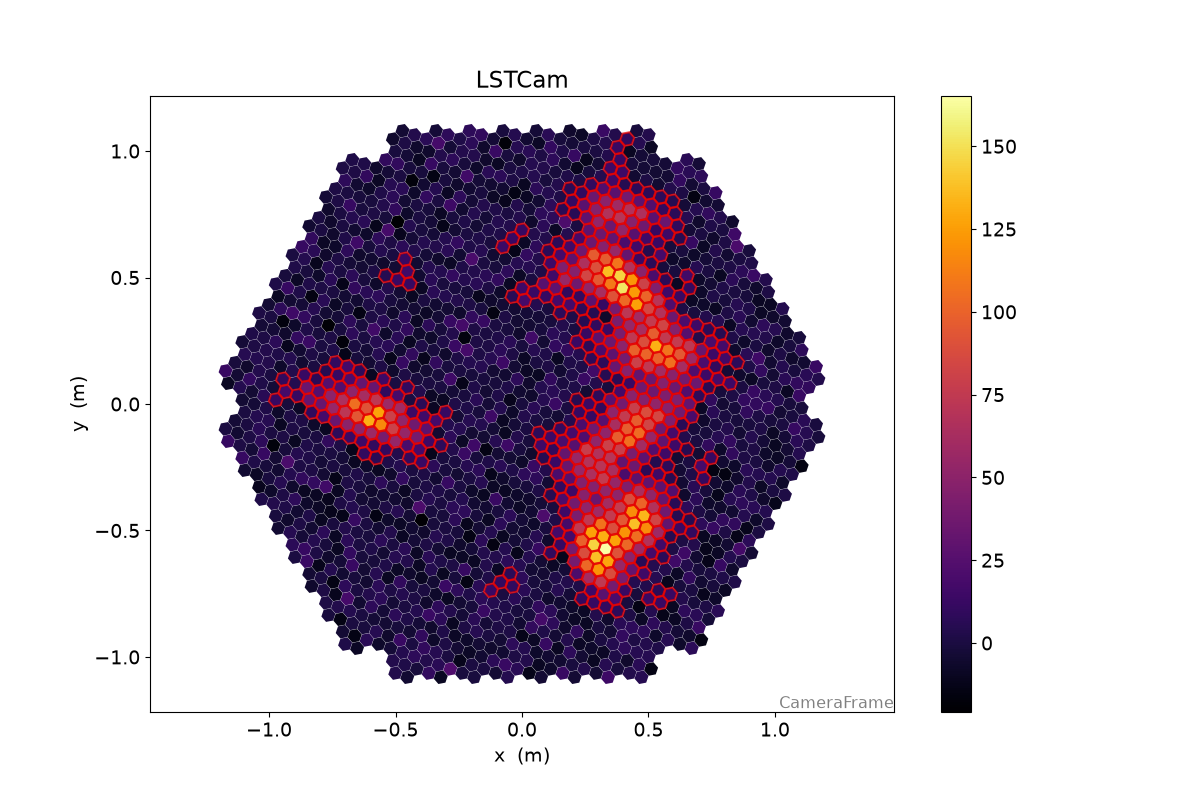
Let’s create a toy images with several islands;
522 rng = np.random.default_rng(42)
523
524 image = np.zeros(geometry.n_pixels)
525
526
527 for i in range(9):
528     model = toymodel.Gaussian(
529         x=rng.uniform(-0.8, 0.8) * u.m,
530         y=rng.uniform(-0.8, 0.8) * u.m,
531         width=rng.uniform(0.05, 0.075) * u.m,
532         length=rng.uniform(0.1, 0.15) * u.m,
533         psi=rng.uniform(0, 2 * np.pi) * u.rad,
534     )
535
536     new_image, sig, bg = model.generate_image(
537         geometry, intensity=rng.uniform(1000, 3000), nsb_level_pe=5
538     )
539     image += new_image
542 clean = tailcuts_clean(
543     geometry,
544     image,
545     picture_thresh=10,
546     boundary_thresh=5,
547     min_number_picture_neighbors=2,
548 )
551 disp = CameraDisplay(geometry)
552 disp.image = image
553 disp.highlight_pixels(clean, color="xkcd:red", linewidth=1.5)
554 disp.add_colorbar()
558 def num_islands_python(camera, clean):
559     """A breadth first search to find connected islands of neighboring pixels in the cleaning set"""
560
561     # the camera geometry has a [n_pixel, n_pixel] boolean array
562     # that is True where two pixels are neighbors
563     neighbors = camera.neighbor_matrix
564
565     island_ids = np.zeros(camera.n_pixels)
566     current_island = 0
567
568     # a set to remember which pixels we already visited
569     visited = set()
570
571     # go only through the pixels, that survived cleaning
572     for pix_id in np.where(clean)[0]:
573         if pix_id not in visited:
574             # remember that we already checked this pixel
575             visited.add(pix_id)
576
577             # if we land in the outer loop again, we found a new island
578             current_island += 1
579             island_ids[pix_id] = current_island
580
581             # now check all neighbors of the current pixel recursively
582             to_check = set(np.where(neighbors[pix_id] & clean)[0])
583             while to_check:
584                 pix_id = to_check.pop()
585
586                 if pix_id not in visited:
587                     visited.add(pix_id)
588                     island_ids[pix_id] = current_island
589
590                     to_check.update(np.where(neighbors[pix_id] & clean)[0])
591
592     n_islands = current_island
593     return n_islands, island_ids
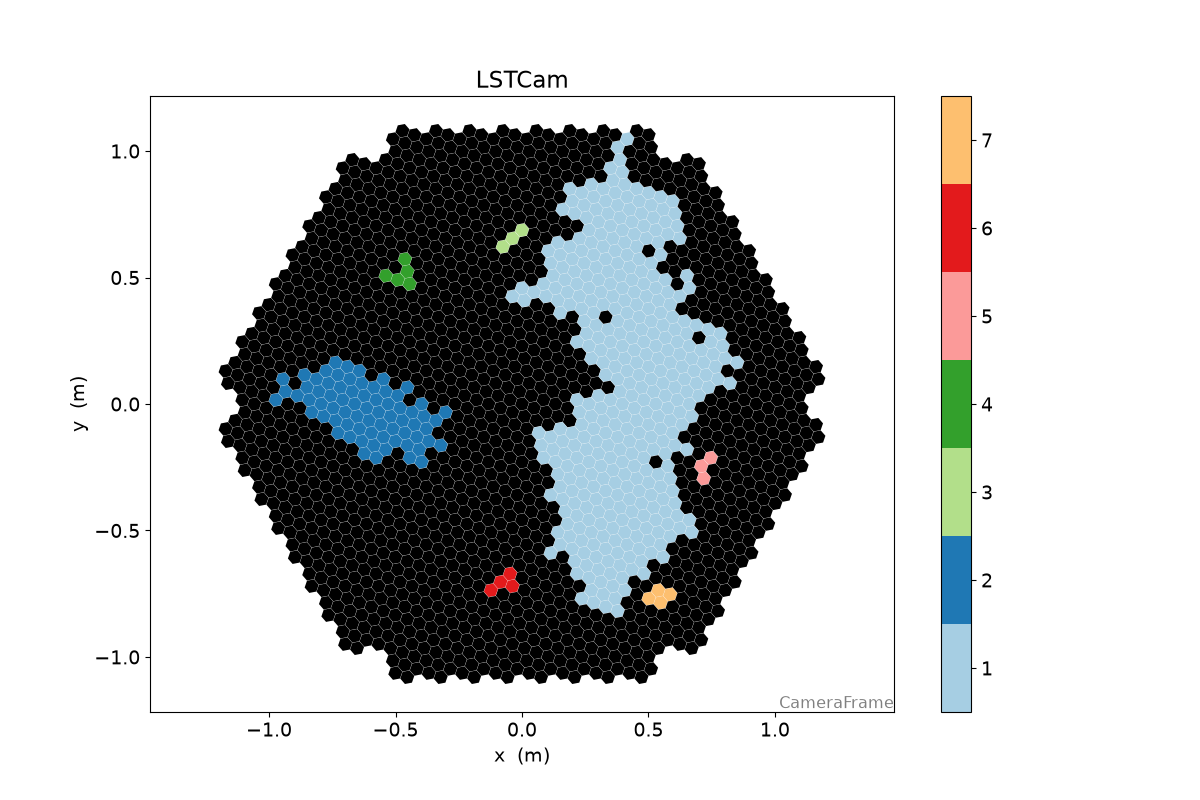
597 n_islands, island_ids = num_islands_python(geometry, clean)
601 cmap = plt.get_cmap("Paired")
602 cmap = ListedColormap(cmap.colors[:n_islands])
603 cmap.set_under("k")
604
605 disp = CameraDisplay(geometry)
606 disp.image = island_ids
607 disp.cmap = cmap
608 disp.set_limits_minmax(0.5, n_islands + 0.5)
609 disp.add_colorbar()
612 timeit.timeit(lambda: num_islands_python(geometry, clean), number=1000) / 1000
0.001906123042001127
616 def num_islands_scipy(geometry, clean):
617     neighbors = geometry.neighbor_matrix_sparse
618
619     clean_neighbors = neighbors[clean][:, clean]
620     num_islands, labels = connected_components(clean_neighbors, directed=False)
621
622     island_ids = np.zeros(geometry.n_pixels)
623     island_ids[clean] = labels + 1
624
625     return num_islands, island_ids
629 n_islands_s, island_ids_s = num_islands_scipy(geometry, clean)
632 disp = CameraDisplay(geometry)
633 disp.image = island_ids_s
634 disp.cmap = cmap
635 disp.set_limits_minmax(0.5, n_islands_s + 0.5)
636 disp.add_colorbar()
639 timeit.timeit(lambda: num_islands_scipy(geometry, clean), number=10000) / 10000
0.0003123096999999689
A lot less code, and a factor 3 speed improvement
Finally, current ctapipe implementation is using numba:
651 timeit.timeit(lambda: number_of_islands(geometry, clean), number=100000) / 100000
1.6972994480001945e-05
Total running time of the script: (0 minutes 32.399 seconds)