

Note
Go to the end to download the full example code.
Histogram aggregation with HistogramAggregator#
This tutorial shows how to:
Build an event table with camera-like data (images and peak times) and some invalid values.
Configure and run HistogramAggregator in chunks.
Access histogram counts, bin edges, summary statistics, and valid-event counts (n_events).
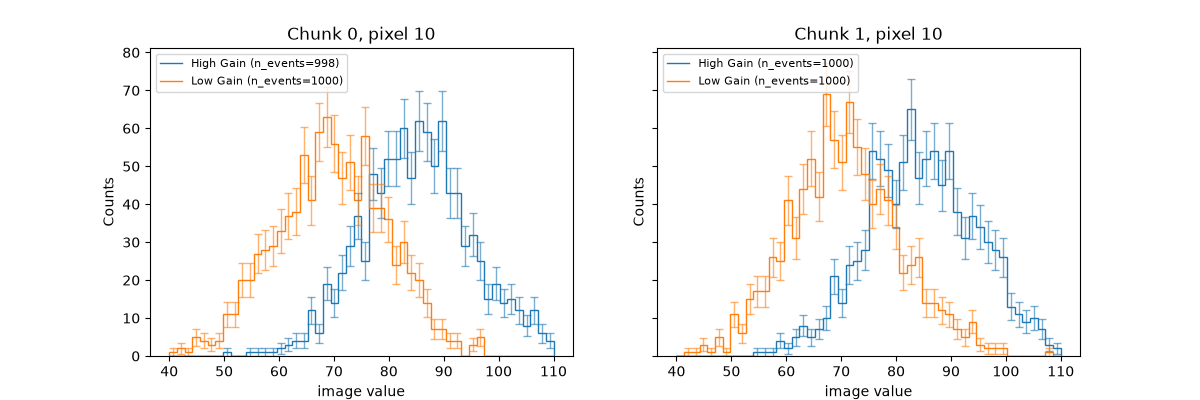
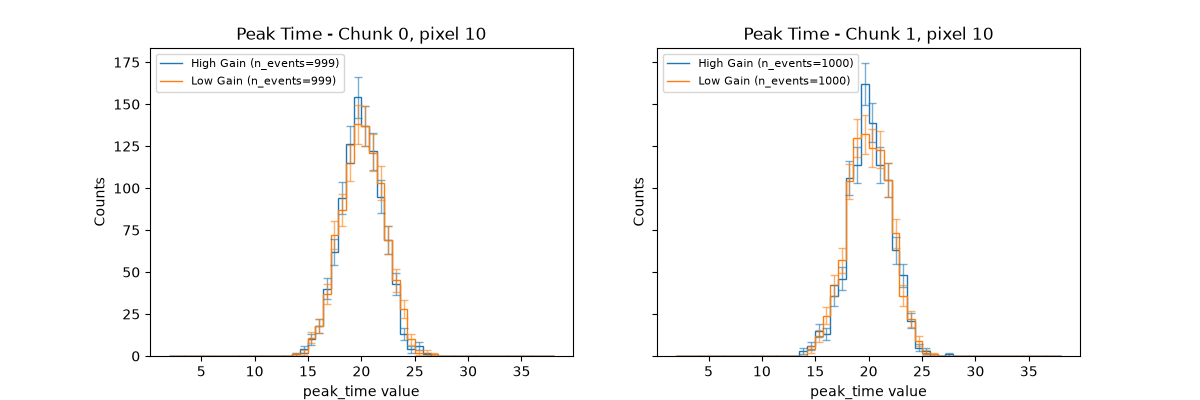
Plot one pixel histogram from the selected chunks and both gain channels for both image and peak_time columns.
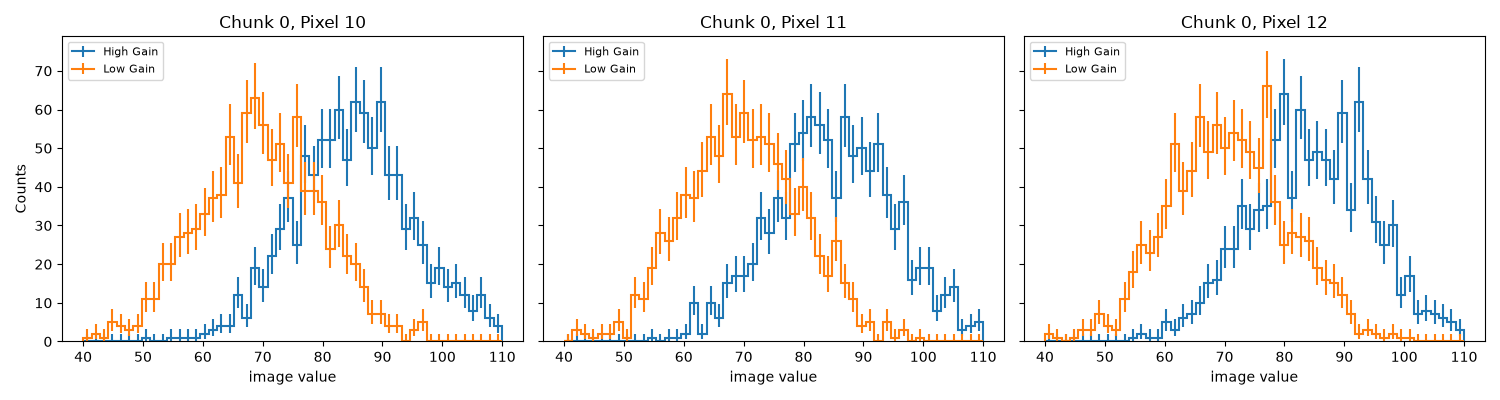
Plot the same histogram using Hist’s built-in plotting functionality after filling a Hist object with the aggregated histogram counts and variances.
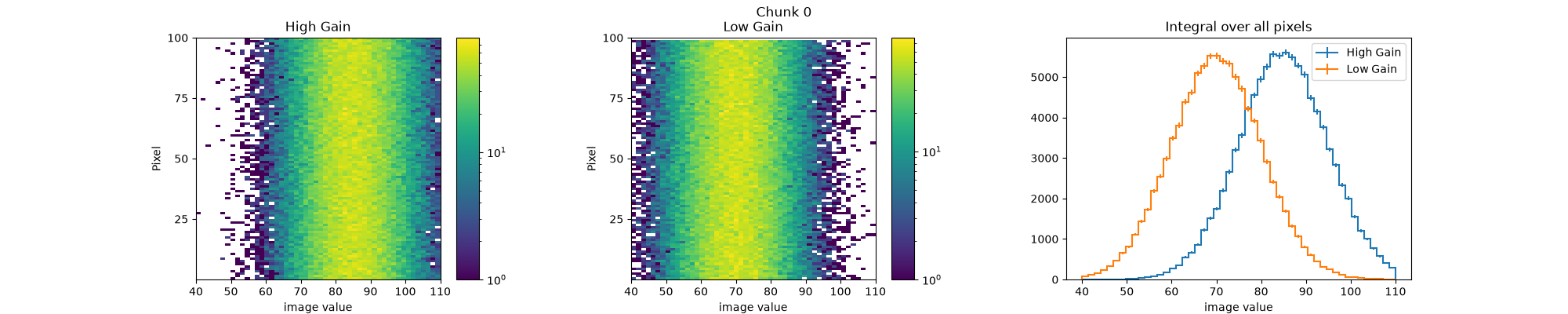
Plot the integral over all pixels for both channels using Hist’s built-in plotting functionality.
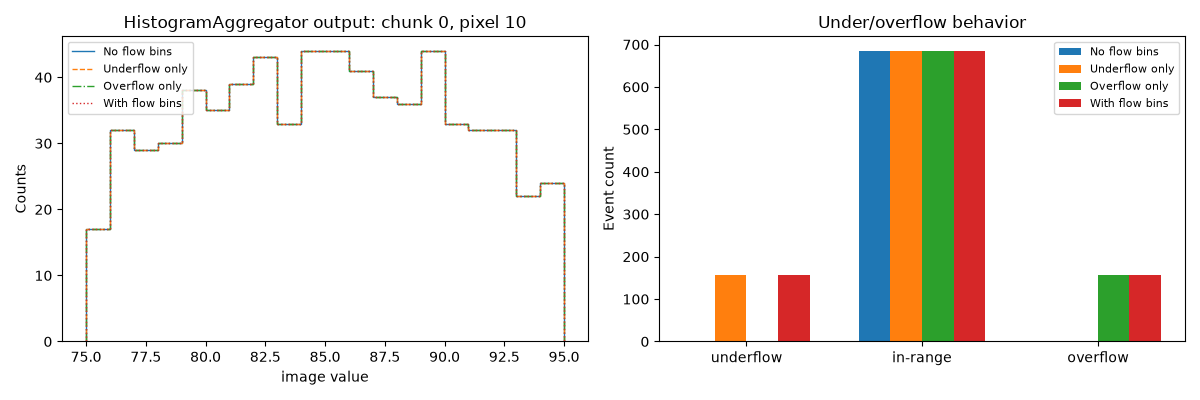
Compare no-flow, underflow-only, overflow-only, and both-flow histograms to see how the outer bins behave.
16 import matplotlib.pyplot as plt
17 import numpy as np
18 from astropy.table import Table
19 from astropy.time import Time
20 from traitlets.config import Config
21
22 from ctapipe.containers import ChunkHistogramContainer
23 from ctapipe.monitoring.aggregator import HistogramAggregator
Create synthetic event-wise camera data#
28 rng = np.random.default_rng(42)
29
30 n_events = 2000
31 n_channels = 2
32 n_pixels = 100
33
34 times = Time(
35     np.linspace(60117.911, 60117.9258, num=n_events),
36     scale="tai",
37     format="mjd",
38 )
39 event_ids = np.arange(n_events)
40 images = rng.normal(loc=85.0, scale=10.0, size=(n_events, n_channels, n_pixels))
41 images[:, 1, :] -= 15  # Simulate lower gain channel by shifting the mean down by 15
42 peak_time = rng.normal(loc=20.0, scale=2.0, size=(n_events, n_channels, n_pixels))
43
44 # Add a few invalid values to demonstrate n_events behavior.
45 images[3, 0, 10] = np.nan
46 images[15, 0, 10] = np.nan
47 peak_time[5, 0, 10] = np.nan
48 peak_time[35, 1, 10] = np.nan
49
50 # Optional static mask over sample dimensions (channel, pixel).
51 # Here we exclude channel 1, pixel 99 for all events.
52 masked_elements_of_sample = np.zeros((n_channels, n_pixels), dtype=bool)
53 masked_elements_of_sample[1, 99] = True
54
55 table = Table(
56     [times, event_ids, images, peak_time],
57     names=("time", "event_id", "image", "peak_time"),
58 )
Configure and run histogram aggregation#
 64 config_image = Config(
 65     {
 66         "HistogramAggregator": {
 67             "chunking_type": "SizeChunking",
 68             "axis_definition": {
 69                 "class_name": "Regular",
 70                 "bins": 50,
 71                 "start": 40.0,
 72                 "stop": 110.0,
 73                 "name": "image",
 74             },
 75             "axis_names": ["channel", "pixel"],
 76         },
 77         "SizeChunking": {"chunk_size": 1000},
 78     }
 79 )
 80
 81 aggregator_image = HistogramAggregator(config=config_image)
 82 result = aggregator_image(
 83     table=table,
 84     col_name="image",
 85     masked_elements_of_sample=masked_elements_of_sample,
 86 )
 87
 88 config_peak_time = Config(
 89     {
 90         "HistogramAggregator": {
 91             "chunking_type": "SizeChunking",
 92             "axis_definition": {
 93                 "class_name": "Regular",
 94                 "bins": 50,
 95                 "start": 2.0,
 96                 "stop": 38.0,
 97                 "name": "peak_time",
 98             },
 99             "axis_names": ["channel", "pixel"],
100         },
101         "SizeChunking": {"chunk_size": 1000},
102     }
103 )
104
105 aggregator_peak_time = HistogramAggregator(config=config_peak_time)
106 result_peak_time = aggregator_peak_time(
107     table=table,
108     col_name="peak_time",
109     masked_elements_of_sample=masked_elements_of_sample,
110 )
111
112 print(f"Number of chunks: {len(result)}")
113 print(f"histogram shape per chunk: {result[0]['histogram'].shape}")
114 print(f"bin edges shape per chunk: {result[0].meta['bin_edges'].shape}")
115 print(f"bin centers shape per chunk: {result[0].meta['bin_centers'].shape}")
116 print(f"n_events shape per chunk: {result[0]['n_events'].shape}")
Number of chunks: 2
histogram shape per chunk: (50, 2, 100)
bin edges shape per chunk: (51,)
bin centers shape per chunk: (50,)
n_events shape per chunk: (2, 100)
Plot the histograms for one pixel with two gain channels#
We aggreagted the histograms in two chunks of 1000 events each, so we have two histograms per gain channel for the selected pixel. We will plot both chunks for the selected pixel and gain channels on the same axes for comparison, and then do the same for the peak_time column in a separate figure.
126 pixel_index = 10
127 gain_label = {0: "High Gain", 1: "Low Gain"}
128
129 fig, axes = plt.subplots(1, 2, figsize=(12, 4), sharey=True)
130 for chunk_index, ax in enumerate(axes):
131     bin_edges = result[chunk_index].meta["bin_edges"]
132     bin_centers = result[chunk_index].meta["bin_centers"]
133     channel_handles = []
134
135     for channel_index in range(n_channels):
136         counts = result[chunk_index]["histogram"][:, channel_index, pixel_index]
137         valid_events = result[chunk_index]["n_events"][channel_index, pixel_index]
138
139         line = ax.stairs(
140             counts,
141             bin_edges,
142             label=f"{gain_label[channel_index]} (n_events={valid_events})",
143         )
144         channel_handles.append(line)
145         color = line.get_edgecolor()
146
147         # Plot bin variances as error bars (use sqrt of variance for error) at bin centers
148         bin_errors = np.sqrt(counts)
149         ax.errorbar(
150             bin_centers,
151             counts,
152             yerr=bin_errors,
153             fmt="none",
154             color=color,
155             elinewidth=1.0,
156             capsize=3,
157             alpha=0.6,
158         )
159
160     ax.set_title(f"Chunk {chunk_index}, pixel {pixel_index}")
161     ax.set_xlabel("image value")
162     ax.set_ylabel("Counts")
163
164     ax.legend(
165         handles=channel_handles,
166         loc="upper left",
167         fontsize=8,
168     )
169
170 plt.show()
Plot peak_time histograms in a separate figure#
176 fig, axes = plt.subplots(1, 2, figsize=(12, 4), sharey=True)
177 for chunk_index, ax in enumerate(axes):
178     bin_edges = result_peak_time[chunk_index].meta["bin_edges"]
179     bin_centers = result_peak_time[chunk_index].meta["bin_centers"]
180
181     channel_handles = []
182
183     for channel_index in range(n_channels):
184         counts = result_peak_time[chunk_index]["histogram"][
185             :, channel_index, pixel_index
186         ]
187         valid_events = result_peak_time[chunk_index]["n_events"][
188             channel_index, pixel_index
189         ]
190
191         line = ax.stairs(
192             counts,
193             bin_edges,
194             label=f"{gain_label[channel_index]} (n_events={valid_events})",
195         )
196         channel_handles.append(line)
197         color = line.get_edgecolor()
198
199         # Plot bin variances as error bars (use sqrt of variance for error) at bin centers
200         bin_errors = np.sqrt(counts)
201         ax.errorbar(
202             bin_centers,
203             counts,
204             yerr=bin_errors,
205             fmt="none",
206             color=color,
207             elinewidth=1.0,
208             capsize=3,
209             alpha=0.6,
210         )
211
212     ax.set_title(f"Peak Time - Chunk {chunk_index}, pixel {pixel_index}")
213     ax.set_xlabel("peak_time value")
214     ax.set_ylabel("Counts")
215     ax.legend(
216         handles=channel_handles,
217         loc="upper left",
218         fontsize=8,
219     )
220
221 plt.show()
Build a Hist object from serialized axis metadata and plot it#
228 # Reconstruct the histogram axis from metadata stored by HistogramAggregator.
229 # In this tutorial, axis_definition uses hist.axis.Regular.
230 chunk_index = 0
231 chunk_histograms_container = ChunkHistogramContainer(
232     **dict(zip(result[chunk_index].colnames, result[chunk_index]))
233 )
234 chunk_histograms_container.meta = result.meta
235
236 # Plot three nearby pixels using Hist's built-in plotting functionality.
237 # Requires 'hist[plot]' to be installed in the environment. Reconstruct
238 # the full histogram as a Hist object for the chunk using hist_from_container method.
239 full_hist = HistogramAggregator.hist_from_container(chunk_histograms_container)
240 pixels_to_plot = [pixel_index, pixel_index + 1, pixel_index + 2]
241 fig, axes = plt.subplots(1, len(pixels_to_plot), figsize=(15, 4), sharey=True)
242
243 for ax, pixel_to_plot in zip(axes, pixels_to_plot):
244     for channel_index in range(n_channels):
245         h = full_hist[{"channel": channel_index, "pixel": pixel_to_plot}]
246         h.name = gain_label[channel_index]
247
248         plt.sca(ax)
249         h.plot(histtype="step", yerr=True, label=h.name)
250
251     ax.set_title(f"Chunk {chunk_index}, Pixel {pixel_to_plot}")
252     ax.set_xlabel("image value")
253     ax.legend(fontsize=8, loc="upper left")
254
255 axes[0].set_ylabel("Counts")
256 plt.tight_layout()
257 plt.show()
Plot the integral over all pixels for both channels using Hist’s built-in plotting functionality#
262 h = full_hist
263
264 fig, ax = plt.subplots(
265     1,
266     3,
267     figsize=(20, 4),
268     gridspec_kw={"width_ratios": [1.15, 1.15, 1.4]},
269 )
270 fig.suptitle(f"Chunk {chunk_index}")
271 h[:, 0, :].plot2d(ax=ax[0], norm="log")
272 h[:, 1, :].plot2d(ax=ax[1], norm="log")
273 channel_stack = h.integrate("pixel").stack("channel")
274 channel_stack[0].name = "High Gain"
275 channel_stack[1].name = "Low Gain"
276 channel_stack.plot(ax=ax[2], legend=True)
277
278 ax[0].set_title(channel_stack[0].name)
279 ax[1].set_title(channel_stack[1].name)
280 ax[2].set_title("Integral over all pixels")
281 for heatmap_ax in ax[:2]:
282     heatmap_ax.set_xlabel("image value")
283     heatmap_ax.set_ylabel("Pixel")
284     heatmap_ax.set_yticks([25, 50, 75, 100], labels=["25", "50", "75", "100"])
285
286 ax[2].set_xlabel("image value")
287 fig.subplots_adjust(wspace=0.5, top=0.88)
288 plt.show()
Demonstrate underflow/overflow via HistogramAggregator axis_definition#
294 FLOW_CONFIGS = {
295     "No flow bins": {"underflow": False, "overflow": False},
296     "Underflow only": {"underflow": True, "overflow": False},
297     "Overflow only": {"underflow": False, "overflow": True},
298     "With flow bins": {"underflow": True, "overflow": True},
299 }
300
301 BASE_AXIS = {
302     "class_name": "Regular",
303     "bins": 20,
304     "start": 75.0,
305     "stop": 95.0,
306 }
307
308 CHUNKING = {
309     "chunking_type": "SizeChunking",
310     "SizeChunking": {"chunk_size": 1000},
311 }
312 # Run all configurations and extract histograms/counts
313 results = {}
314 histograms = {}
315 flow_counts = {}
316
317 for label, flow_options in FLOW_CONFIGS.items():
318     config = Config(
319         {
320             "HistogramAggregator": {
321                 "chunking_type": "SizeChunking",
322                 "axis_definition": {
323                     **BASE_AXIS,
324                     **flow_options,
325                 },
326                 "axis_names": ["channel", "pixel"],
327             },
328             "SizeChunking": {"chunk_size": 1000},
329         }
330     )
331
332     # Aggregate the histogram which will return an astropy table
333     result = HistogramAggregator(config=config)(
334         table=table,
335         col_name="image",
336         masked_elements_of_sample=masked_elements_of_sample,
337     )
338     # Create a Hist object from the aggregated histogram and
339     # metadata for the selected chunk using the hist_from_tablerow method.
340     histogram_cont = HistogramAggregator.hist_from_tablerow(result[chunk_index])
341     histogram = histogram_cont[{"channel": 0, "pixel": pixel_index}]
342
343     flow_view = histogram.view(flow=True)
344     axis_kwargs = result.meta["axis_kwargs"]
345
346     results[label] = result
347     histograms[label] = histogram
348     flow_counts[label] = {
349         "underflow": (int(flow_view[0]) if axis_kwargs.get("underflow") else 0),
350         "in_range": int(histogram.values().sum()),
351         "overflow": (int(flow_view[-1]) if axis_kwargs.get("overflow") else 0),
352     }
353
354 valid_events = results["With flow bins"][chunk_index]["n_events"][0, pixel_index]
355
356 fig, axes = plt.subplots(1, 2, figsize=(12, 4))
357
358 styles = {
359     "No flow bins": "-",
360     "Underflow only": "--",
361     "Overflow only": "-.",
362     "With flow bins": ":",
363 }
364
365 # Left: histogram comparison
366 for label, histogram in histograms.items():
367     axes[0].stairs(
368         histogram.values(),
369         histogram.axes[0].edges,
370         linestyle=styles[label],
371         label=label,
372     )
373
374 axes[0].set_title(
375     f"HistogramAggregator output: chunk {chunk_index}, pixel {pixel_index}"
376 )
377 axes[0].set_xlabel("image value")
378 axes[0].set_ylabel("Counts")
379
380 axis_margin = 0.05 * (BASE_AXIS["stop"] - BASE_AXIS["start"])
381 axes[0].set_xlim(
382     BASE_AXIS["start"] - axis_margin,
383     BASE_AXIS["stop"] + axis_margin,
384 )
385
386 axes[0].legend(fontsize=8, loc="upper left")
387
388 # Right: flow-bin behavior
389 x = np.arange(3)
390 labels = ["underflow", "in-range", "overflow"]
391
392 bar_offsets = {
393     "No flow bins": -0.18,
394     "Underflow only": 0.00,
395     "Overflow only": 0.18,
396     "With flow bins": 0.36,
397 }
398
399 bar_width = 0.18
400
401 for label, offset in bar_offsets.items():
402     counts = flow_counts[label]
403
404     axes[1].bar(
405         x + offset,
406         [
407             counts["underflow"],
408             counts["in_range"],
409             counts["overflow"],
410         ],
411         width=bar_width,
412         label=label,
413     )
414
415 axes[1].set_xticks(x + 0.09, labels)
416 axes[1].set_ylabel("Event count")
417 axes[1].set_title("Under/overflow behavior")
418 axes[1].legend(fontsize=8)
419
420 plt.tight_layout()
421 plt.show()
Total running time of the script: (0 minutes 2.042 seconds)